Bir çok sistem yöneticisinin en büyük sorunlarından birisi de ağ üzerindeki makinelerin restart yapmasıdır. Peki bu bilgiye nasıl ulaşacağız ve bu bilgi bizim ne işimize yarayabilir?
Makinenin restart için beklediğini aşağıdaki PowerShell komutu ile basit bir şekilde öğrenebilirsiniz.
PowerShell: Change Port and URL quickly and accurately in multiple configuration files
PowerShell: Birden çok yapılandırma dosyasında Port ve URL’u hızlı ve doğru değiştirin

TR: Eğer bir çok uluslu bir şirkette altyapı yönetiyorsanız, bir küçük dosyayı tek tek düzenlemeniz gerekebilir. çünkü şirketin bir çok ülkeye hizmet veren bir web sayfası olacaktır. web sayfasının küçük ayar dosyası olacaktır. Bu dosyaları tek tek açıp düzenlemeye gerek yok. tüm ayarlamaları yapan bir script ile her ayarı hızlı ve doğru bir şekilde yapabilirsiniz.
EN: If you are managing the infrastructure in a multinational corporation, you may need to edit a small file one by one. because the company will have a web page that serves many countries. web page will be the small setting file. There is no need to open these files individually. With a script that makes all the adjustments you can make every setting quickly and accurately. Continue reading “PowerShell: Change Port and URL quickly and accurately in multiple configuration files”
If the folder exist, appy the .reg file
Klasör varsa, .reg dosyasını uygulayın.

Bazı uygulamaları makine kurduktan sonra ayarlarını her makinede tek tek yapmak gerekebilir. Yada aşağıdaki gibi bir script ile, eğer yüklediğimiz uygulamanın klasörü makinede var ise ayarları Regedit’e yükleyen daha hızlı bir yöntem seçebiliriz.
After installing some applications on the computers, you may need to adjust the settings of the applications one by one. Or, with a script such as the following, we can choose a faster method that installs the settings into Regedit if the machine has the application folder. Continue reading “If the folder exist, appy the .reg file”
Create a shortcut with script
I create a shortcut with a script, but why? Some applications do not know the cause, do not create a shortcut during installation or after installation. The following Script allows you to create shortcuts with the variables entered.
PowerShell: Get information for an update installation when it is started, finished, and how long take
Microsoft’s updates never end. According to some system administrators, this is a headache. According to some system administrators, it is necessary for security. Although you are working with too many updates, in some cases you may need detailed information about the update installation. When did the update begin? When was the update installed? How long was the update set up?

In such situations grab the PowerShell help 🙂 Continue reading “PowerShell: Get information for an update installation when it is started, finished, and how long take”
Find files easily with simple batch file
Knowing the files on computers is one of the issues that every system administrator usually deals with. You can easily learn it by creating a simple batch command with the following commands.
open Notepad and copy following commands and paste in this note file. Continue reading “Find files easily with simple batch file”
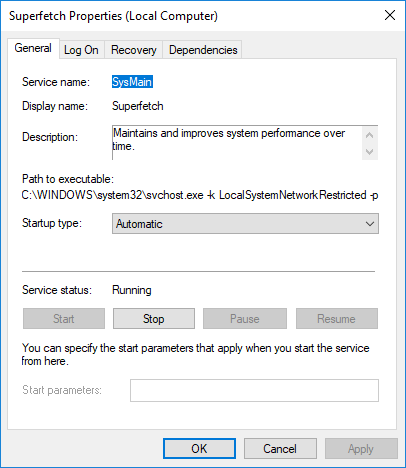
What is Superfetch and how it will be closed
If you are using Windows 10, the Windows operating system automatically turns Superfetch off or on according to the speed of the current hardware. You do not have to deal with it. If you like control, you can turn off Superfetch by following the steps below.

Continue reading “What is Superfetch and how it will be closed”
Problems refreshing icons on desktop and system tray (Solution)
I have come across a problem with a few customers, at least a couple of machines, with the problem of not refreshing the System Tray ( right next to the clock
) and the desktop icons.

You can simply solve this problem by following the steps below.
Lets start, Continue reading “Problems refreshing icons on desktop and system tray (Solution)”
Step by Step Creating Software Update system with SCCM
The most important thing I did when Deploying Updates with SCCM was that I did not create a Software Update Deployment again and again. For this reason, I have created a system that can be used by adding every new update.

Lets start…
Continue reading “Step by Step Creating Software Update system with SCCM”
Access useful information from the SCCM’s DB #1
There were thousands of machines in the majority of the large companies I consulted and they wanted to follow these machines with SCCM. Reports that are available in the SCCM sometimes may not provide enough information. In such cases the solution comes with Microsoft SQL Management Studio. If you are a system administrator, you will find yourself writing SQL 🙂

I’m not sure if I can help you write SQL, but I have a lot of ready-made SQL that my customers like a lot. I plan to share these with you one by one. Most of my customers wanted a report like the one below. I have changed the report according to the wishes of the years and I share the final status with you.
Continue reading “Access useful information from the SCCM’s DB #1”